1
| void cv::resize(InputArray src, OutputArray dst, Size dsize, double fx=0, double fy=0, int interpolation = INTER_LINEAR)
|
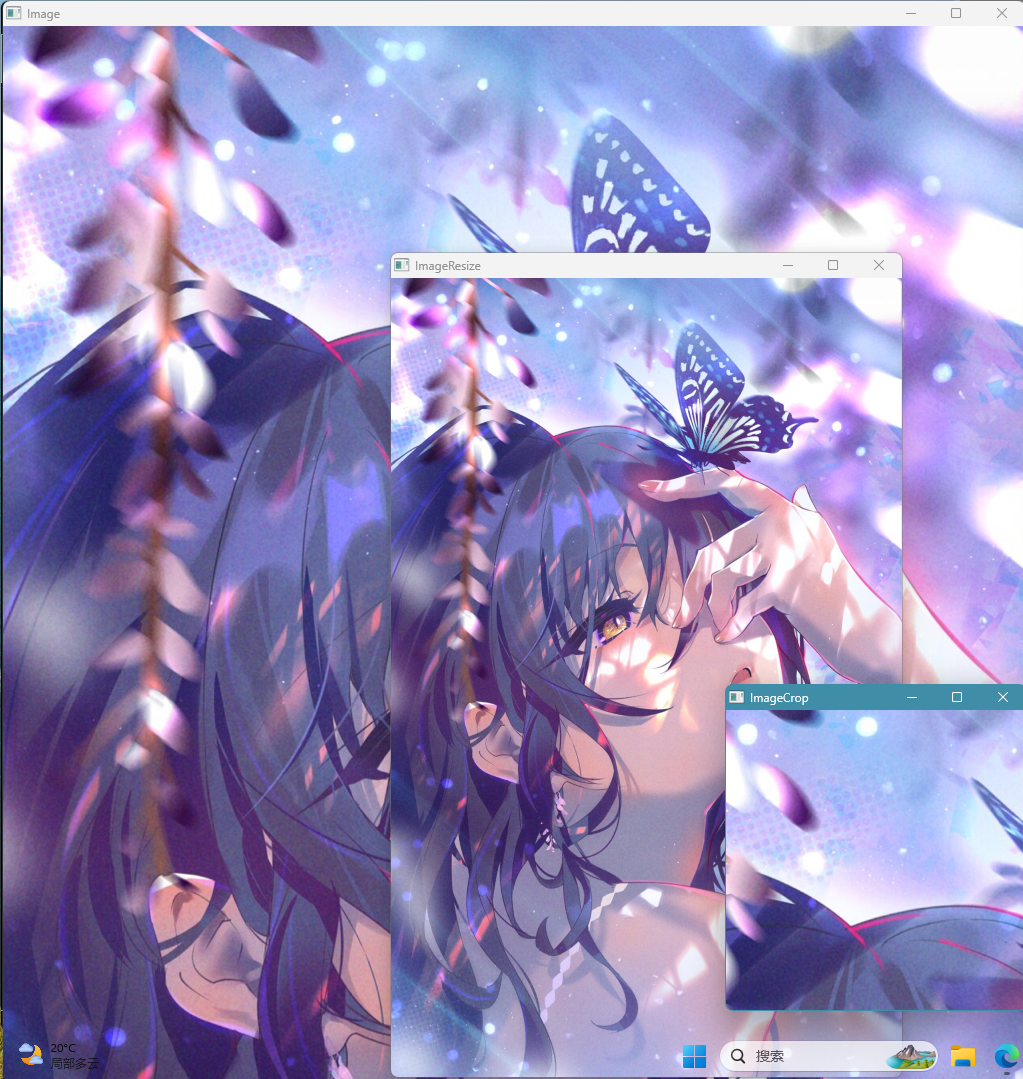
调整图像的大小。函数 resize 将图像 src 的大小缩小到或最大到指定的大小。请注意,不考虑初始 dst 类型或大小。相反,大小和类型是从 src、dsize、fx 和 fy 派生的。
1
2
3
4
5
6
7
8
9
10
11
12
13
14
15
16
17
18
19
20
21
| #include <opencv2/imgcodecs.hpp>
#include <opencv2/highgui.hpp>
#include <opencv2/imgproc.hpp>
#include <iostream>
using namespace cv;
using namespace std;
int main()
{
std::string path = "../lesson1_pictureRead/img1.jpg";
cv::Mat img = imread(path);
cv::Mat imgResize, imgCrop;
std::cout << img.size() << std::endl;
resize(img, imgResize, Size(), 0.5, 0.5);
Rect my_roi(200, 100, 300, 300);
imgCrop = img(my_roi);
imshow("Image", img);
imshow("ImageResize", imgResize);
imshow("ImageCrop", imgCrop);
waitKey(0);
return 0;
}
|